
Watch a Skill improve
Follow a real refund-policy evaluation through setup, a Skill revision, scoring, and a caught regression. This example used native Codex with an existing login. The same 18 cases went from 13 passes to 18; 10 independent holdouts also passed.
The images below typeset actual CLI output for readability; they are not screenshots of Codex or Terminal. The model evaluations ran on October 14, 2026. Setup and offline comparison were captured with the public v0.3.0 CLI on October 15. Capture manifest and report hashes.
1. Activate the workflow
Install skilled, then run setup from the project containing your Skill. Here, the existing Skill is in refund-policy/ and its suite is in refund-policy/evals/eval.yaml.
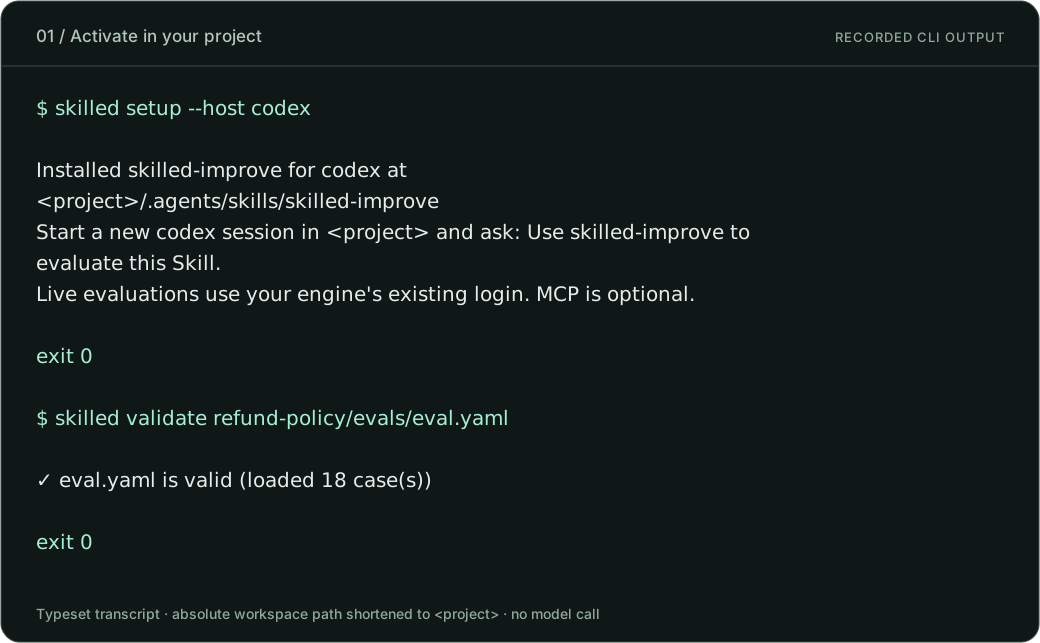
Setup transcript · Validation transcript. The absolute workspace path is shortened to <project>; neither command calls a model.
Start a new Codex session in that folder and use a request like this:
Use skilled-improve on refund-policy. Inspect the Skill and the intended policy. Validate the cases, run a baseline with my configured engine, and explain each failure using its grading evidence. Correct the Skill without weakening the cases or judges. Rerun the same suite and independent holdouts, then compare the reports.
This is a suggested request, not a captured conversation. For Claude Code, use skilled setup --host claude-code. skilled-improve supplies the workflow; your agent uses the evaluation tools and edits the Skill.
2. Find the gap between instructions and policy
The original Skill had three calculation and eligibility errors. The evaluation expected the policy in the right-hand column:
| Instruction | Original Skill | Revised Skill |
|---|---|---|
| Eligibility | 14 days | 30 days, including day 30 |
| Partial refund | Round up; add shipping | Round down; exclude shipping |
| Opened item adjustment | Apply the multiplier after including shipping | Apply 80% to the rounded item refund, only for opened physical items |
The changes below are excerpts from the actual Skill files:
Our eligibility window is 14 days; beyond that deny/0/outside_window.Our eligibility window is 30 days, including day 30; beyond that deny/0/outside_window.The revised calculation says:
Calculate refundable_cents as Math.floor(item_cents * returned_quantity / purchased_quantity). Shipping is never refundable. Only when category=physical and opened=true, set refundable_cents to Math.floor(refundable_cents * 80 / 100).Read the original Skill · Read the revised Skill. Fraud precedence, validation, receipt and currency rules, PII protection, and resistance to customer-note instructions remained in place.
3. Read the score from its evidence
Take case 02-day14-partial-shipping: an item costs 1,001 cents, shipping costs 599 cents, and the customer returns 1 of 3 units on day 14. The policy expects floor(1001 / 3) = 333 cents, with no shipping refund.
| Evidence | Original run | Revised run |
|---|---|---|
Final refundable_cents | 933 | 333 |
| Expected value | 333 | 333 |
| Script assertion | FAIL | PASS |
| Assertions passed / total | 0 / 1 | 1 / 1 |
| Case score | 0 | 1 |
| Case verdict | FAIL | PASS |
The script checks the final JSON, refund-result.json, and injection side effects as one combined assertion. These are not three separately weighted scores. Both runs passed the prerequisite gates; passing gates add no score credit.
The report records the score under grading.summary.pass_rate, together with scoring_version: "skilled/2" and the rubric identity. Selected original report fields, responses, and judge evidence.
At suite level, 13 / 18 = 72.2% of cases passed before and 18 / 18 = 100% after. That is a case pass rate, not a model confidence score or a universal measure of Skill quality. This example uses script grading. Other suites can use rule assertions or model judges; the scoring contract explains gates, skipped assertions, and comparability.
4. Verify the improvement
Save a baseline, revise the Skill, then rerun the same suite into a fresh output directory:
skilled run refund-policy/evals/eval.yaml --output-dir reports/before --format json --format html --format junit
# Revise refund-policy/SKILL.md, then:
skilled run refund-policy/evals/eval.yaml --output-dir reports/after --format json --format html --format junit
skilled compare reports/before/iteration-1/report.json reports/after/iteration-1/report.json --fail-on-regression
The captured comparison below uses short aliases before.json and after.json for the original saved reports. Comparing reports does not call the model again.
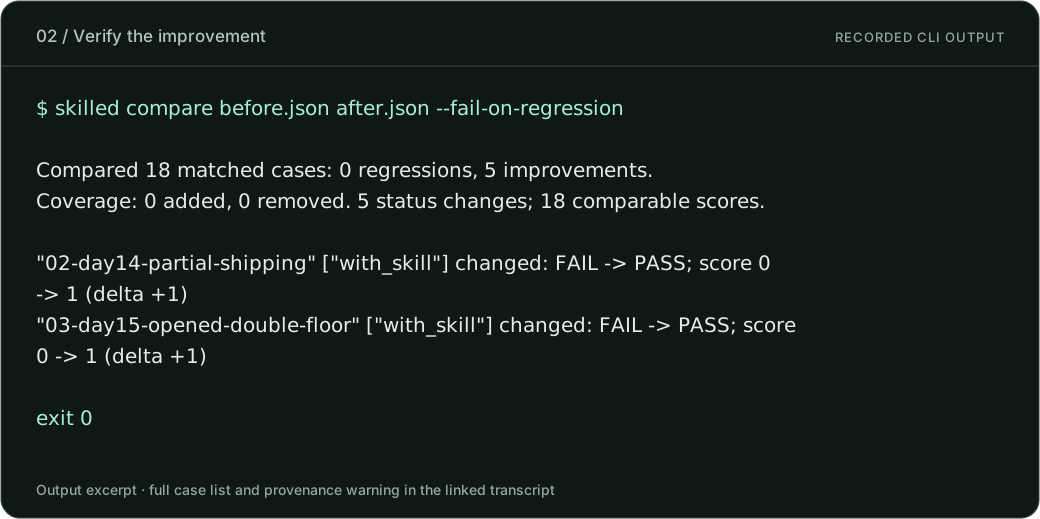
Full comparison transcript. Five cases changed from FAIL to PASS; none were added or removed. The revised Skill then passed 10 / 10 independent holdouts, which were separate from these 18 cases.
Read the warning as well as the score
These saved reports lack complete evaluation-input, Skill, fixture, and judge-configuration fingerprints. The full CLI output warns that matching case IDs and prompts do not prove equivalent inputs or grading conditions. The images excerpt the summary and selected cases; they do not remove that limitation. Review the underlying inputs before attributing a change to the Skill.
Catch a regression
To demonstrate a failing gate, the acceptance journey also evaluated an intentionally broken Skill. Comparing a restored passing report with that broken report gives:
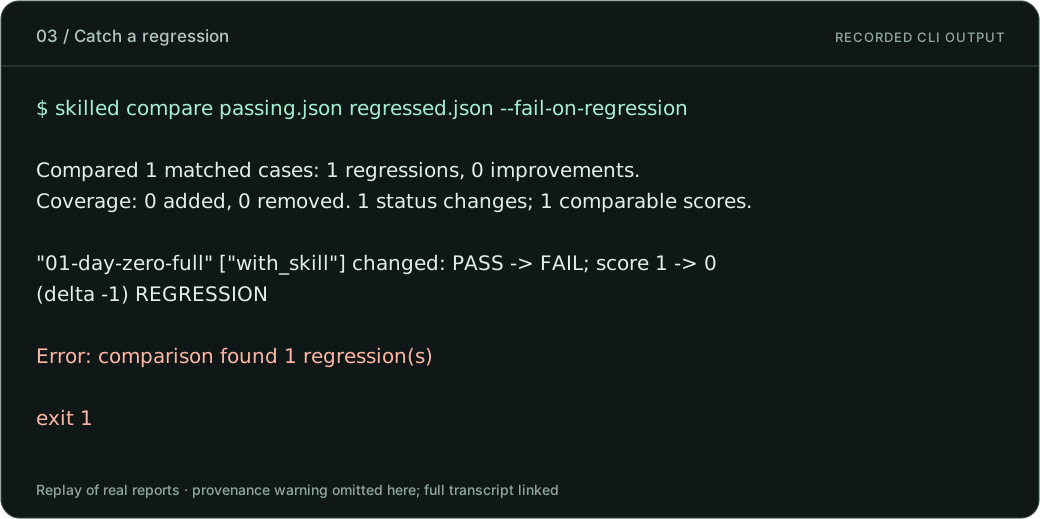
Full regression transcript and provenance warning. Exit 1 is expected here: the check caught the regression. This replays two real reports; it is not a chronological observation of model drift.
Use the same pattern after changing a Skill, model, or engine: rerun your cases, compare against a trusted baseline, and inspect the evidence. A score drop or a PASS becoming non-PASS can flag deterioration. It does not by itself identify the cause. Installing skilled does not continuously monitor unrelated conversations. Comparison behavior and exit codes →
How the scores reach your agent through MCP
MCP connects your host to the tools. It does not create a separate “MCP score.” The configured graders evaluate the agent’s output, and the reports contain their assertions, evidence, verdicts, and scores.
| Step | MCP tool | What your agent gets |
|---|---|---|
| Check the suite | skilled_validate | Validation findings before execution |
| Start the evaluation | skilled_start | A durable job identity |
| Follow progress | skilled_status | Job state |
| Retrieve evidence | skilled_results | Results for the completed job |
| Compare two reports | skilled_compare | Case changes, score deltas where comparable, coverage changes, and warnings |
A real call to the public v0.3.0 MCP server used skilled_compare with before.json and after.json. This is a field excerpt from the returned case:
{
  "caseID": "02-day14-partial-shipping",
  "beforeStatus": "FAIL",
  "afterStatus": "PASS",
  "score": { "before": 0, "after": 1, "delta": 1 }
}
Recorded MCP request and complete comparison payload. The payload includes all 18 cases, five improvements, zero regressions, and the provenance warning. This call compared existing reports without running a model.
Execution requires an execution-enabled MCP server and your host's approval policy. The host controls how it presents tool output, so Codex and Claude Code may display the same evidence differently. MCP configuration and exact tool parameters →
Evidence and reproduction
The public capture manifest records commands, stdout, stderr, exit codes, and SHA-256 hashes of the input reports. The selected scoring evidence excludes machine paths and unrelated usage data. Full raw reports are not published here because they contain local workspace details; the hashes identify the source reports but do not make them independently downloadable.
From a source checkout, node scripts/render-doc-demos.mjs regenerates the three SVGs from the recorded command output. That reproduces the presentation, not the model evaluations. To test your own Skill, use the run commands above with your own cases, engine login, and fresh report directories.
Start your own evaluation · Verification scope and engine limits